Added Music List Do Not Remain After Reloading
My MP3 Player takes a simple approach to temporary music selection. Audio files that you add to the player are available for the current browser session. When you reload the player page, the previously added music files are no longer listed and need to be selected again.
This behavior provides an important practical advantage for users who have limited storage space. The player does not need to maintain a permanent local copy of the selected music collection merely to remember what was previously added to the interface.
For you with smartphones that have limited internal storage, this can make storage management easier. There is no need to repeatedly clear browser data simply because temporary music selections were made during a previous listening session. Reloading the player naturally starts a fresh music-selection session.
Your original music files remain where you stored them on your device. The player does not need to duplicate your entire music collection into a separate application storage area simply to play the files.
My MP3 Player - Free, Fast, and Private Web Music Player
My MP3 Player is a free web-based music player from www.Appu.uk, a collection of useful web applications, tools, and games designed for everyday use. My MP3 Player is designed for people who want a simple, fast, and convenient way to listen to their own music files directly from their device.
My MP3 Player is a lightweight web application that does not require an account, registration, or sign up. There is also no need to upload your music to an online music service before you can listen to it. The application is designed around local audio playback, allowing you to select supported audio files from their own device and play them directly through a modern web browser.
Appu.uk is the main website behind My MP3 Player and provides a growing collection of browser-based applications, tools, and games. You can visit Appu.uk homepage to explore the wider collection.
Play Your Own Music Directly From Your Device
One of the most important features of My MP3 Player is the ability to add audio files directly from your device. Your music does not need to be transferred to a server or uploaded to a cloud music service simply to play it in the application.
When you select music using the browser's file-selection system, My MP3 Player works with the audio files available on your own device. The selected files are used by My MP3 Player for playback in your browser. The application is designed around local audio playback rather than an online music-storage system.
This means that you can use My MP3 Player with music already stored on your smartphone, tablet, laptop, or desktop computer. It is especially useful for you who maintain your own collection of MP3 files and want a clean browser-based interface for listening to them.
No Internet Data Is Needed to Add Your Music
My MP3 Player is designed so that adding music does not require sending the music files over the internet. When you choose audio files from your device, the browser gives the application access to those selected files locally for playback. The music file itself does not need to be uploaded to a remote music server just to add it to the player.
This is an important difference between a local music player and an online music platform. With an online service, your audio may need to be transferred to a server before it can be processed or played. With My MP3 Player, the selected local audio files are handled by the browser on your device for the purpose of playback.
Therefore, you do not need an internet connection to transfer your personal music collection to My MP3 Player. Once the player application itself has been loaded, the process of selecting and playing local audio is designed to work without sending your music files to an online storage service.
Your internet connection may still be required to initially open or update the web application, depending on whether the application has already been cached by your browser. However, adding your local music files to the player is a local browser operation rather than an upload process.
Supported Audio File Formats
My MP3 Player supports a range of commonly used audio formats. This allows you with different types of music collections to play more than just standard MP3 files.
The supported file extensions include:
- MP3
- WAV
- OGG
- OGA
- M4A
- AAC
- FLAC
- OPUS
Browser and device support can vary between audio formats, so actual playback capability may depend on the browser and operating system being used. Nevertheless, the application is designed to support these commonly used audio file types wherever they are supported by your browser.
Designed for Best Quality Clean and Clear Sound
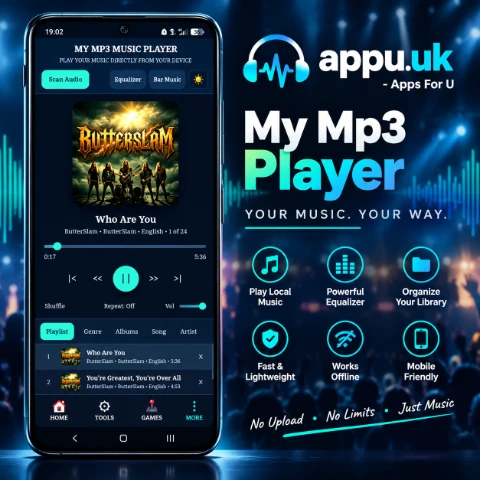
My MP3 Player is designed with a focus on delivering a Best Quality clean and clear listening experience. The application provides a straightforward playback environment intended to preserve a good listening experience from supported local audio files without unnecessary processing.
The resulting sound quality also depends on the original audio file, its encoding, bitrate, recording quality, the device's audio hardware, headphones or speakers, and the browser's audio capabilities. For the best result, users should start with clean, high-quality audio files and suitable playback equipment.
My MP3 player is particularly suitable for you who want to listen to their own carefully maintained music collection while having access to additional audio controls through the built-in equalizer.
A Real Working Equalizer
The equalizer is one of the important features of My MP3 Player. It is not simply a decorative interface element. The application provides functioning equalizer controls designed to modify the sound characteristics during music playback and improve the listening experience.
Different listeners have different preferences. Some of you prefer stronger bass, while others want clearer vocals, brighter high frequencies, or a sound profile that matches a particular type of music. The equalizer provides a convenient way to adjust the character of the playback without modifying the original audio file itself.
My MP3 Player includes several equalizer presets such as Flat, Rock, Pop, Jazz, Classical, Electronic, Vocal Boost, Treble Boost, and many more Soundtrack.
These presets provide convenient starting points for different listening preferences and musical styles. You can experiment with the available settings and choose the sound profile that feels most appropriate for the music you playing.
Two Themes: Dark and Light
My MP3 Player provides two interface themes: Dark Theme and Light Theme. You can choose the appearance they prefer according to their environment and personal taste.
The Dark Theme can provide a comfortable appearance for users who prefer darker interfaces, especially when listening to music in a dim environment. The Light Theme provides a brighter interface for who prefer a traditional light application appearance.
The ability to switch between the two themes allows My MP3 Player to adapt to different users rather than forcing everyone to use a single visual style.
Music Navigation and Library Categories
Managing a collection becomes easier when music can be viewed through different categories. My MP3 Player provides navigation for music collections using information such as playlist, genre, album, song, and artist.
Genre information can be especially useful for users who maintain a diverse music library. The application supports a broad range of genre classifications, including:
Blues, Classic Rock, Country, Dance, Disco, Funk, Grunge, Hip-Hop, Jazz, Metal, New Age, Oldies, Other, Pop, R&B, Rap, Reggae, Rock, Techno, Industrial, Alternative, Ska, Death Metal, Pranks, Soundtrack, Euro-Techno, Ambient, Trip-Hop, Vocal, Jazz+Funk, Fusion, Trance, Classical, Instrumental, Acid, House, Game, Sound Clip, Gospel, Noise, AlternRock, Bass, Soul, Punk, Space, Meditative, Instrumental Pop, Instrumental Rock, Ethnic, Gothic, Darkwave, Techno-Industrial, Electronic, Pop-Folk, Eurodance, Dream, Southern Rock, Comedy, Cult, Gangsta, Top 40, Christian Rap, Pop/Funk, Jungle, Native American, Cabaret, New Wave, Psychadelic, Rave, Showtunes, Trailer, Lo-Fi, Tribal, Acid Punk, Acid Jazz, Polka, Retro, Musical, Rock & Roll, and Hard Rock.
This extensive genre classification makes the application suitable for a wide variety of music collections, from classical and instrumental recordings to rock, electronic music, hip-hop, reggae, jazz, dance, soundtrack, ambient, and many other styles.
Fast Web Application With a Small File Size
My MP3 Player is built as a lightweight web application. The application file size is approximately less than 600 KB, helping it load quickly compared with much larger web applications.
A small application footprint can be especially useful on mobile devices where you may have limited bandwidth, slower connections, or limited device resources. The goal is to keep the music-player interface responsive while avoiding unnecessary application overhead.
The web application is also designed for a very fast initial load. Instead of requiring a large software package or a traditional application installation process, users can open the player directly in a modern browser and start using its features.
Low RAM Usage
Another notable characteristic of My MP3 Player is its lightweight memory footprint. The application itself is designed to use relatively little RAM, with approximately 3 to 5 MB of application memory under the intended lightweight usage model, although actual browser memory usage can vary depending on the browser, operating system, loaded audio files, audio decoding, and other active browser processes.
This lightweight approach is particularly useful for smartphones with limited RAM. Keeping the application itself small helps the player remain focused on its primary purpose: playing music without becoming an unnecessarily heavy application.
Useful Appu.uk Navigation While Listening to Music
My MP3 Player also includes a navigation area that connects users with other applications available from Appu.uk. This creates a different kind of music-listening experience because users can access various web tools and games without leaving the Appu.uk ecosystem.
While listening to music, you can explore different tools or games available from Appu.uk. This can make the experience more enjoyable for people who like listening to music while using browser-based utilities or playing casual games.
The navigation area provides access to various Appu.uk applications, allowing the music player to become part of a larger collection of free web applications rather than an isolated music page.
Free and No Sign Up Required
My MP3 Player is available as a free web application and does not require to create an account or sign up before using the player. There is no registration form that needs to be completed simply to play your own local music files.
This makes the initial experience straightforward: open the application, add supported audio files, select a song, and start listening.
The application is also designed without disturbing advertising elements that interrupt the primary music-listening experience. The focus remains on the player, your music, playback controls, equalizer, and navigation.
Install My MP3 Player on Chrome
My MP3 Player can also be installed through Google Chrome when browser provides installation option for the web application. Installation allows My MP3 player to behave more like an application on a compatible device, making it easier to launch again without manually entering the website address each time.
To install My MP3 Player on Chrome, open the Appu.uk website and navigate to the My MP3 Player application. After the player has loaded, open the Chrome browser menu. Depending on your device and Chrome version, look for an option such as Install app, Install, or Add to Home screen.
Follow the instructions displayed by Chrome and confirm the installation. After installation, an icon for My MP3 Player can appear in your application area or home screen, depending on the device and browser. You can then launch the player directly without repeatedly searching for the website.
Made for Simple Everyday Music Listening
My MP3 Player combines the features that many local music listeners need in one lightweight web application: local audio selection, multiple supported audio formats, playlist and library navigation, genre organization, album and artist browsing, playback controls, shuffle, repeat, volume control, working equalizer presets, dark and light themes, and fast web-based access.
It is designed for who want control over their own music collection without unnecessary registration, complicated setup, or large software downloads. The application can be used directly from a browser and can also be installed through Chrome when the installation option is available.
With an application size of approximately less than 600 KB and a lightweight design intended to keep resource usage low, My MP3 Player aims to provide a fast and responsive music experience. Its local approach to adding music also means that your audio files do not need to be uploaded to an online music server just to play them.
Whether you listen to Rock, Pop, Jazz, Classical, Electronic, Dance, Metal, Country, Blues, Reggae, Hip-Hop, Rap, Soundtrack, Ambient, Slow Rock, or another musical style, My MP3 Player provides a simple environment for enjoying your own collection.
Part of the Appu.uk Website
My MP3 Player is part of Appu.uk, a website providing free browser-based applications, tools, and games. The Appu.uk ecosystem is designed to make useful web applications accessible directly from the browser without requiring users to install large software packages for everyday tasks.
Users can learn more about Appu.uk and its background through the About Us page. Information about privacy practices is available on the Privacy Policy page.
For additional legal and website information, users can read the Disclaimer and Terms of Use. If you need to contact the website owner regarding Appu.uk or one of its applications, visit the Contact Us page.
If you are looking for a free MP3 player application, free music player app, fast web music player media apps, lightweight music applications, no sign up music player, local audio player, browser MP3 player, web application for local music, or installable Chrome music player, My MP3 Player provides a simple way to enjoy your own music collection directly from your device.